Thank you! You're Almost There...
There's ONE MORE IMPORTANT thing to do:
1
Check your email to make sure you received an email from me, "Feelfulness."
2
Add my email to your contact list to ensure you receive all future guides and information about the course.
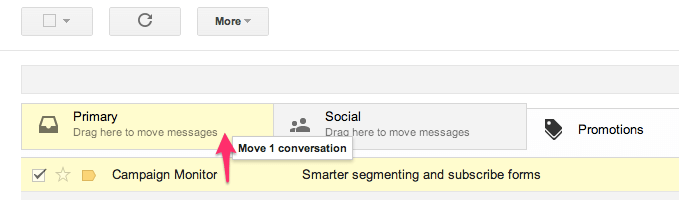
For Gmail User: If you use Gmail on your desktop, the message might be in your "Social" or "Promotional" tab. Simply click and drag the message into your Primary folder.
If you don't see the message in any of these folders, check your spam folder and mark the message "Report Not Spam."
For iPhone Users: If you are accessing your email on your iPhone, select "Details" in the right column of the email. And then click on my name "CreatingEase."
Finally, select "Add to VIP."


Welcome Abroad
I help practitioners and coaches define their Therapeutic Identity, Generate States of being with FeelFulness methodology to master the skill of Transferring Consciousness, therapeutically to their clients and avoid emotional contagion, and in 60 days or less.
I'm honored to be a part of your journey.
What to do next?
1
Join me on LinkedIn
Connect and meet people with similar interest. https://www.linkedin.com/in/feelfulness/
https://www.linkedin.com/company/feelfulness/
3
Book a Free Consultation Call
Click on the link to book a call
https://feelfulness.org/f/free-phone-consult
Thank You , again !